
Rich Markdown editor
Write with a full toolbar, live preview, and keyboard shortcuts for fast editing.
Stop rewriting the same prompts. Create templates once, add variables like {{ name }} or {{ context }}, and generate perfect variations in seconds — Markdown-based.
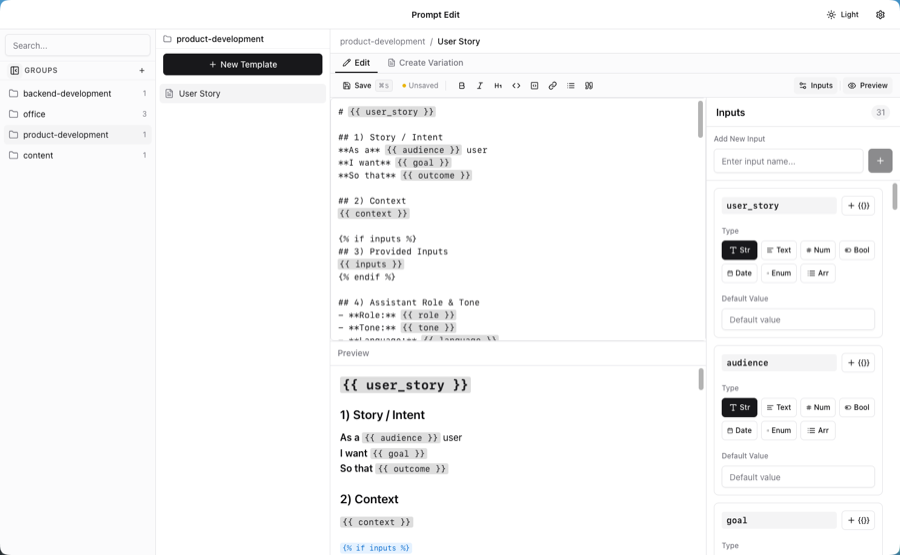
Everything you need to write better prompts, faster.
Write with a full toolbar, live preview, and keyboard shortcuts for fast editing.
Support for text, textarea, number, boolean, date, dropdown, and array inputs.
Pre-fill values and define dropdown options for consistent prompt generation.
Include or exclude content dynamically with if/else blocks and visual feedback.
Store filled prompts as reusable variations and copy to clipboard instantly.
Your templates stay as standard Markdown files in any folder you choose.
Flexible inputs for any prompt scenario.
Single-line text input
Multi-line text blocks
Numeric values
True/false toggles
Predefined options
Lists of values
Writing a blog post template with placeholders
Ready-to-use prompts with variables you can customize.
# Blog post

Write me a comprehensive blog post about {{ topic }} for {{ target_group }}.

Include:
- An engaging introduction with a hook
- 3-5 main sections with h2 headings
- Actionable tips or insights
- A conclusion with a clear call-to-action

Target keyword: {{ keyword }}

Word count: {{ word_count }}

Tone: {{ tone }}# Meeting
Design an optimized meeting for: {{ purpose }}.
- Attendees: {{ attendees }}
- Duration: {{ time }}
Include:
1. Pre-meeting preparation checklist
2. Structured agenda with time allocations
3. Clear objectives and desired outcomes
4. Decision-making framework
5. Facilitation techniques for engagement
6. Action item template
7. Follow-up procedures
8. Virtual meeting best practices
9. Conflict resolution strategies
10. Success metrics to evaluate meeting effectiveness# Brand
Create a complete brand identity for {{ product }} in the {{ industry }} targeting {{ group }}.
Brand personality: {{ personality }}
Include:
1. Brand strategy and positioning
2. Visual identity concept
3. Color palette with psychological reasoning
4. Typography hierarchy
5. Logo variations and usage rules
6. Image style and photography direction
7. Voice and tone guidelines
8. Brand application examples (business cards, website, packaging)
9. Brand guidelines document structure
10. Implementation roadmapLearn the techniques behind effective prompting — each with examples, FAQs, and best practices.
Prompt Edit is a free macOS app for creating and managing reusable prompt templates. You write templates with variables and conditional logic, fill them in before each use, and copy the result to any AI tool — ChatGPT, Claude, Gemini, or any other LLM.
Yes, Prompt Edit is completely free during the public beta. There are no subscriptions, no feature limits, and no accounts required. Download it, use it, and keep all your prompts locally.
Yes. Prompt Edit works entirely offline. Your templates are stored as local files on your Mac — no cloud sync, no internet connection required. You decide where your prompts live.
Prompt Edit works with any AI tool that accepts text input — ChatGPT, Claude, Gemini, Mistral, Perplexity, and any local LLM. It produces plain text you copy and paste; it does not connect to any AI service directly.
Completely. Prompt Edit never sends your prompt content anywhere. All templates, variables, and filled prompts stay on your Mac. There are no analytics on prompt content, no user accounts, and no external data transmission.
A prompt template is a reusable prompt with named placeholders — variables — that you fill in each time. Instead of rewriting the same prompt from scratch, you define it once with variables like {{topic}} or {{audience}}, then fill those in before each use.